MMM Optimizer: Single Brand
When to use it
Use single-brand optimization when one approved model covers one brand and you want to decide how that brand's annual budget should be split across its own vehicles.
Typical questions:
- "Keep the budget flat. Where should we shift spend?"
- "We can add 10%. Which vehicles should get it?"
- "The budget is being cut by 10%. What should go first?"
- "TV must come down by exactly 10%. What is the best split of the rest?"
What you provide and what the system supplies
| You provide | The system supplies |
|---|---|
| Objective: volume, revenue or profit | One approved response curve per vehicle |
| Budget change: none, increase, or decrease by a percentage | Current annual spend per vehicle (from the model baseline or your merged file) |
| Optional per-vehicle limits (directional or range) | Unit value (profit per unit) and price (revenue per unit) per vehicle |
| Optional Traditional / Digital group limits | Historical weekly spend, for the weekly plan |
| Optional macro assumptions (media-cost and price inflation) | Per-week attribution, when available, for the efficiency tilt |
| Target year for the plan | Locks for non-paid media and vehicles that failed fit-quality checks |
If no approved model exists, the run stops with a clear message. The optimizer never fabricates curves from raw data.
How a request becomes an optimization problem
Total budget
The requested change applies to the movable (unlocked) spend; locked spend is added back unchanged:
Target total budget for a requested change .
Terms: is the current spend of locked vehicles; is the current spend of unlocked vehicles; is the requested change as a fraction.
Vehicle limits
- No explicit limit (increase 0, decrease 0): the vehicle gets the default guardrail of ±15%, widened only if the budget itself moves further.
- One-sided limit: a directional target, pinned to exactly .
- Two-sided limit: a range, .
Campaign-level names (such as a TV campaign) roll up to their parent vehicle. If two campaign keys roll up to the same vehicle with different limits, the request is rejected as conflicting rather than silently merged. A directional limit that cannot be matched to any vehicle is rejected, and the message lists the available vehicles.
Traditional and Digital groups
Every vehicle belongs to Traditional or Digital. Each group's total is held in a band, whether or not you asked for a group limit. The movement cap is 10% by default and widens only if the budget moves further:
Group share band, with no explicit group request.
Terms: is the group's share of the budget; is the group's current spend; and are the smallest and largest totals its member vehicles can reach under their own bounds; is the ratio of target to current movable budget.
If you request a group move, it is treated like a vehicle limit (one-sided means a target, two-sided means a range), clamped first into what the vehicles can deliver and then into the movement cap. If the request had to change, the output says so, for example:
digital: channel-level moves are capped at 10% up, so the request was applied as +10.0%.
If the group bands could not jointly sum to the budget, they are widened only as much as needed, starting with groups you did not ask about, and the change is reported.
Locked vehicles
Vehicles that must not move are pinned at current spend and still count toward the total:
- non-paid media such as trade marketing and sponsorship,
- vehicles that failed fit-quality checks at model time,
- vehicles with no current spend (there is nothing to reallocate from).
Locked non-paid media is excluded from the paid-media rollups in the reports.
Run steps
- Resolve the approved model for the brand (stops with a clear message if none exists).
- Load vehicles and current spend.
- Build the scenario: total budget, vehicle bounds, group bands, locks.
- Solve and validate: the SLSQP solve, then the five validation gates.
- Build deliverables: the three-level table, the weekly plan, the summary, and the report.
Worked example
This is an illustrative example on synthetic numbers, computed with the production solver. It is not client data.
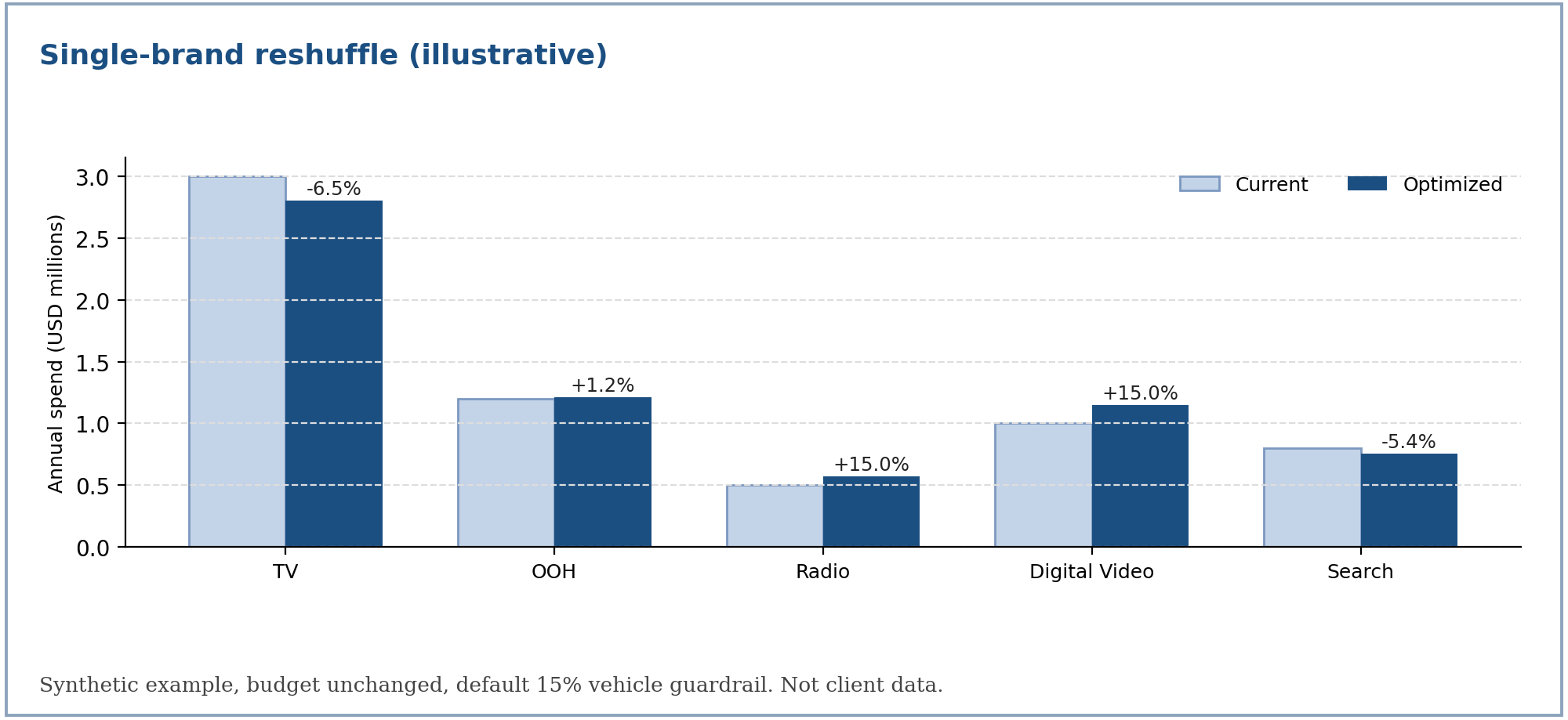
Setup. Five vehicles with Weibull-CDF curves, a profit value of 4.0 per unit of response for every vehicle, and a combined budget of 6.5 million.
| Vehicle | Group | Ceiling | Scale | Shape | Current spend |
|---|---|---|---|---|---|
| TV | Traditional | 1,300,000 | 2,000,000 | 1.3 | 3,000,000 |
| OOH | Traditional | 600,000 | 1,800,000 | 1.2 | 1,200,000 |
| Radio | Traditional | 450,000 | 700,000 | 1.5 | 500,000 |
| Digital Video | Digital | 950,000 | 1,700,000 | 1.1 | 1,000,000 |
| Search | Digital | 450,000 | 500,000 | 1.0 | 800,000 |
Scenario A: reshuffle (budget unchanged)
| Vehicle | Current | Optimized | Change | Marginal ROI | Saturation | Zone | At bound |
|---|---|---|---|---|---|---|---|
| TV | 3,000,000 | 2,803,978 | −6.5% | 0.793 | 0.79 | Diminishing | No |
| OOH | 1,200,000 | 1,214,400 | +1.2% | 0.793 | 0.46 | Optimal | No |
| Radio | 500,000 | 575,000 | +15.0% | 1.660 | 0.53 | Optimal | Upper |
| Digital Video | 1,000,000 | 1,150,000 | +15.0% | 1.234 | 0.48 | Optimal | Upper |
| Search | 800,000 | 756,622 | −5.4% | 0.793 | 0.78 | Diminishing | No |
The three vehicles free to move share one marginal ROI (0.793). Radio and Digital Video earn more at the margin but are held by the 15% guardrail, which is exactly the signal that a looser guardrail there would help. Total response rises by 38,514 units (+1.67%), worth about 154 thousand in profit at 4.0 per unit, with no extra spend. All five validation gates pass.
Scenarios B and C
| Vehicle | Current | B: budget +10% | Change | C: TV −10% and Digital +12% | Change |
|---|---|---|---|---|---|
| TV | 3,000,000 | 3,215,000 | +7.2% | 2,700,000 | −10.0% |
| OOH | 1,200,000 | 1,380,000 | +15.0% | 1,245,000 | +3.8% |
| Radio | 500,000 | 575,000 | +15.0% | 575,000 | +15.0% |
| Digital Video | 1,000,000 | 1,150,000 | +15.0% | 1,150,000 | +15.0% |
| Search | 800,000 | 830,000 | +3.7% | 830,000 | +3.8% |
| Total | 6,500,000 | 7,150,000 | 6,500,000 | ||
| Response lift | +155,430 (+6.74%) | +36,790 (+1.60%) |
- B: a 10% budget increase is spread toward the vehicles with the highest marginal return, with three vehicles reaching their upper limit.
- C: TV is pinned to exactly −10%. The request for Digital +12% exceeds the 10% group cap, so it is applied as +10% and the output reports the adjustment. The cost of the pin is visible: lift is 36,790 against 38,514 for the free reshuffle.
Reading the result
| Item | How to read it |
|---|---|
| Zone | Where the optimized spend sits on the curve: Threshold, Growth, Optimal, Diminishing or Saturation |
| At bound | The vehicle is held by a limit; compare its marginal ROI with the shared value to see what the limit costs |
| Adjustments | Any request that had to be clamped, with the requested and applied values and the reason |
| Validation gates | All five should pass; a failure is shown in the summary |
What can go wrong
| Situation | What happens |
|---|---|
| The budget falls outside what the bounds allow | The run stops with the totals and what to change: reduce a pinned vehicle's change, unlock a vehicle, or change the budget |
| Heavy locking and a large budget cut | The cut applies only to the movable slice, so the target stays reachable |
| A group request exceeds the movement cap | It is clamped and reported in the adjustments |
| A directional vehicle key matches nothing | The run is rejected and lists the available vehicles |
| Two campaign keys with different limits roll up to one vehicle | The run is rejected as conflicting |
| The PDF report cannot be rendered | The CSV and summary are still delivered |
For the formulas behind each step, see mmm-optimizer-methodology.