MMM Optimizer: Headless
What is the headless optimizer?
The headless optimizer runs an optimization on a saved scenario against a pinned, approved model fit, with no interactive session. Nobody has to sit in the optimizer screen while it works:
- you start it from a saved scenario, an agent, or the API;
- it returns immediately with a run identifier;
- the solve runs as a background job;
- you collect the same outputs (tables, weekly plan, summary, report) when it completes.
It is the same solver and the same outputs as the interactive experience, so a headless result means exactly what an interactive one does. Headless is a way of running, not a different model.
It never refits the model. It reallocates budget from a fit that has already been approved, which is why it can run repeatedly and quickly.
How it is started
| Surface | How it starts a headless run |
|---|---|
| Media Workspace | Run the optimizer on a saved project scenario; it uses the project's primary model |
| Agent Builder | An optimization agent submits the request and collects the result |
| Chat assistant | The assistant runs the optimization as a long-running step and resumes with the result |
| API | A request with the datasource, objective and constraints |
Single-brand and cross-brand runs both work this way. Cross-brand runs carry one pinned fit per brand.
Lifecycle
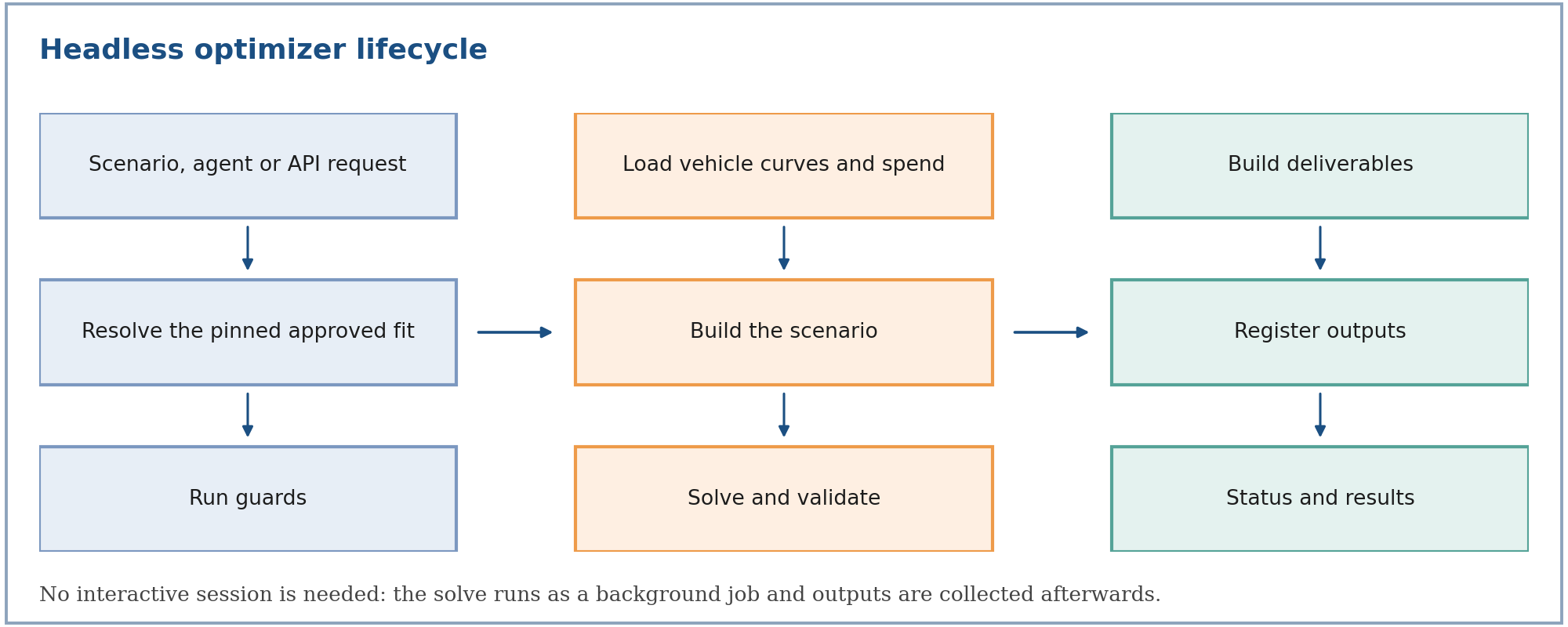
- Request. A scenario, agent or API call supplies the objective, budget change and constraints.
- Resolve the fit. The run targets one approved fit. In Media Workspace that is the project's primary fit, and in a cross-brand run it is the pinned fit for each brand, rather than simply the newest one.
- Run guards. The run is refused if a guard fails (see below).
- Load vehicle curves and spend. Current spend comes from the model baseline, or from the supplied merged file or override.
- Build the scenario. The same mapping as the interactive path: total budget, guardrails, group or brand bands, locks.
- Solve and validate. SLSQP, the stall safeguard, and the five validation gates. The convergence trace, the per-vehicle curve parameters, and the average ROI before and after are logged.
- Build deliverables. The detailed media analysis, the weekly plan, the summary and the report.
- Register outputs. The files are stored and linked to the run.
- Status and results. The run moves from pending to completed or failed, and the outputs can be read.
Guarantees
| Guarantee | What it means |
|---|---|
| Fails loudly | If no fitted model exists, or the model has no response curves, the run stops with a clear message. The optimizer never invents curves from raw data. |
| Pinned where a fit is chosen | A Media Workspace scenario runs against the project's primary fit, and a cross-brand run against each brand's pinned fit. A newer fit appearing later never silently replaces it. |
| Deterministic | There is no sampling. The same fit, request and data produce the same allocation. |
| Nothing silent | Requests that had to be clamped, locks that were applied, assumptions used, and solver status are all written to the summary. |
| Best-effort report | If the PDF cannot be rendered, the tables, the weekly plan and the summary are still delivered. |
Run guards
A headless run is refused, with a clear message, when:
| Guard | Why |
|---|---|
| No primary model is set for the project | There is no approved fit to optimize against |
| The primary model has no channel response data | The optimizer would otherwise fall back to a different model, so it refuses instead. A smoke run, or a model with a vehicle that failed the conversion gates, has no registered response curves, so it is refused here |
| The scenario does not belong to the project, or you cannot see it | Only the author, or a shared reader, may run a scenario |
| The scenario is already running | A second run would overwrite the first run's result |
Scenarios and staleness
A scenario stores the objective, budget change and constraints. In a project, it runs against the project's primary fit. If the primary model is later changed, a scenario whose last result came from a different fit is marked stale, so you can see that its numbers no longer reflect the current primary model, and re-run it deliberately.
Repeated runs of an unchanged scenario against an unchanged fit give identical numbers. A newer fit never replaces a pinned one automatically.
Outputs
The outputs are the same as the interactive path:
| Output | Content |
|---|---|
| Detailed media analysis | Portfolio, group or brand, and vehicle rows with current vs optimized spend, volume, revenue, profit, ROI and cost per unit |
| Weekly flighting plan | Each vehicle's annual optimum phased by its own history and attribution |
| Optimization summary | Solver status, validation gates, adjustments, macro assumptions used, model used, target year |
| Report (PDF) | Business-readable summary and weekly budget charts |
Scenario comparisons surface the ROI change of the All Media row, not the profit change: a spend-cutting scenario can show a profit drop while still improving ROI, so per-dollar efficiency is the fairer comparison.
Typical use cases
| Use case | How headless helps |
|---|---|
| Compare scenarios | Run several saved scenarios against the same primary fit and compare their ROI change |
| Repeatable planning cycles | Re-run a saved scenario after the fit is re-approved, and see that it is flagged stale until you do |
| Agent-driven planning | Let an agent run the optimization and write the result into a report |
| Portfolio planning | Run a cross-brand scenario with one pinned fit per brand |
When a run does not complete
| Symptom | Likely cause | What to do |
|---|---|---|
| Refused at start | A run guard failed | Read the message; it names the missing model, the permission, or the running scenario |
| Stops with an infeasible-budget error | Locks and limits leave no room for the budget | Reduce a pinned vehicle's change, unlock a vehicle, or change the budget |
| Completes but a validation gate fails | Solver or constraint issue in the solution | Read the summary; do not use the allocation until it passes |
| Completes with adjustments | Some requests were clamped | Read the adjustments for the requested and applied values |
| No PDF | The report render failed | Use the tables and summary; they are delivered regardless |
For the formulas behind the solve, see mmm-optimizer-methodology.